
⏱️ Late Start (LS) & Late Finish (LF) in Microsoft Project
Late Start and Late Finish tell you the last safe moment a task can start/finish without delaying the project’s final finish date (CPM logic).
✅ What LS & LF mean (simple)
In Microsoft Project, Late Start (LS) and Late Finish (LF) answer this: “How late can this task move without pushing the project end date?”
The latest date a task can start without delaying the project finish.
The latest date a task can finish without delaying the project finish.
🖼️ Visual references
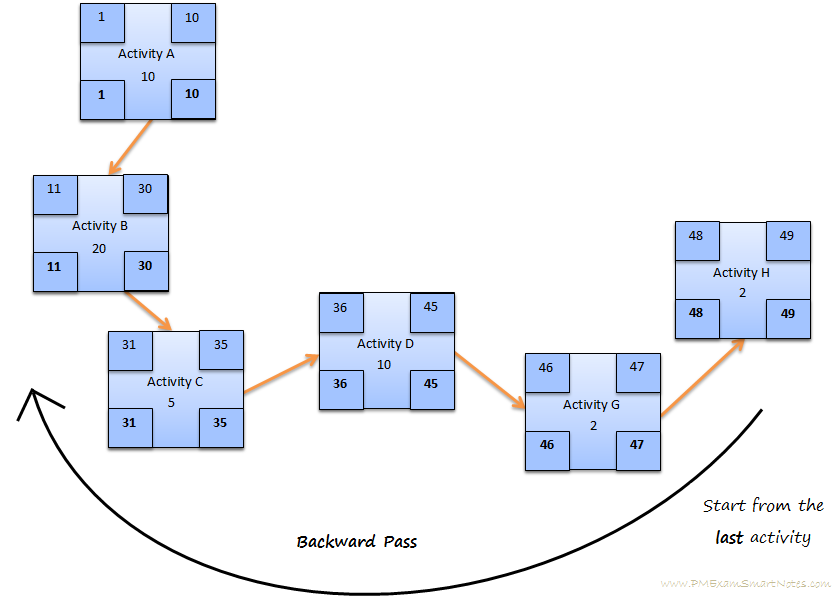

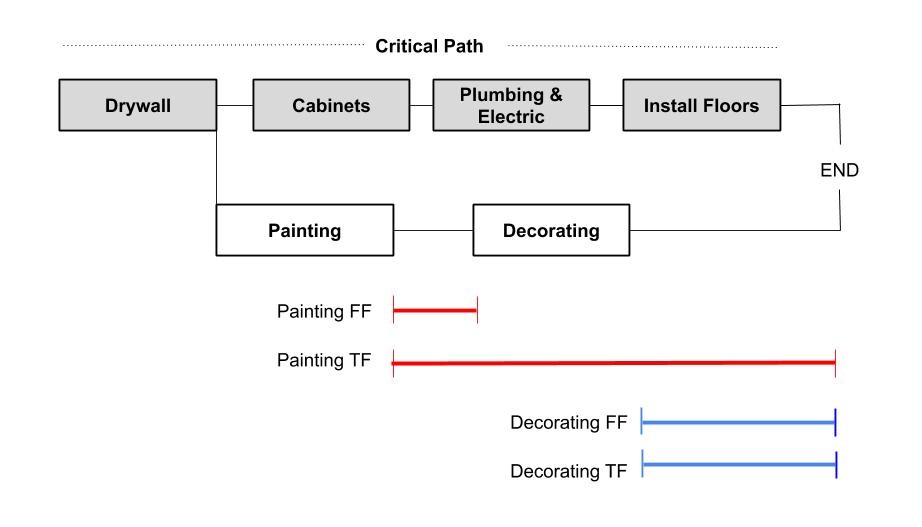
🔹 1) Late Start (LS)
Definition: The latest date a task can start without delaying the project finish.
If a task starts after its Late Start, the task is eating more than its allowed float and can push the project end date.
🔹 2) Late Finish (LF)
Definition: The latest date a task can finish without delaying the project finish.
If a task finishes after its Late Finish, the project completion date can slip.
🧮 Relationship (easy formula)
📊 Simple example
| Task | Duration | Late Start | Late Finish |
|---|---|---|---|
| Foundation | 5 days | Day 10 | Day 15 |
- You can start as late as Day 10
- You must finish by Day 15
- Starting on Day 11 → ❌ risk of project delay
🟥 Critical Path connection (very important)
- Early Start = Late Start
- Early Finish = Late Finish
- Total Float = 0
- Late dates are later than early dates
- Positive float (slack)
- Can be moved safely (within float)
🔍 Why LS & LF matter (construction / engineering use)
- 🛠 Reschedule safely without delaying handover
- 👷 Move labor & resources to urgent tasks
- ⚠️ Identify risky tasks with very small float
- 📈 Recover delays using float wisely (crash/fast-track only when needed)
Early = soonest possible
Late = last safe moment
📌 Next steps (tap to open)
Where do I show Late Start (LS) and Late Finish (LF) in Microsoft Project?
In a Task Sheet view, right-click any column header (like “Start” or “Finish”) → Insert Column → search for Late Start and Late Finish → insert them.
LS/LF vs Float vs Slack — what’s the difference?
- LS/LF = last safe dates (schedule boundaries)
- Total Float (Slack) = how much a task can slip without delaying the project finish
- If Total Float = 0 → task is critical (no safe slip)
How do I use LS/LF to recover a delayed construction schedule?
- Check tasks with small float (near-critical) and protect them.
- Move resources from tasks with larger float to the urgent ones.
- Use crashing (extra labor/overtime) only on tasks that affect the finish date.
- Use fast-tracking carefully (overlap tasks) where quality risk is acceptable.